


Product development system for software teams
Product development system for software teams
Product development system for software teams
summary
How Linear designs with AI
As software becomes easier to make, how do design teams protect the work of understanding what should be built
Founded in 2019, Linear set out to rethink how software teams plan and build by replacing slow, fragmented project management tools with a faster, more opinionated system. Today, more than 40,000 companies, including OpenAI, Coinbase, and Ramp, use Linear to bring clarity and momentum to their product development workflows.
As AI changes how software is built, Linear is expanding beyond issue tracking into a shared workspace where teams can turn ideas, feedback, context, and code into products. But when execution becomes easier, the harder question becomes more important: how do teams decide what is worth building in the first place?
Conversations with co-founder & CEO Karri Saarinen alongside product designers Charlie Aufmann and Isha Kumar revealed a shared philosophy: AI should expand a designer’s capacity to think rather than replace it. While tools may change by the day, Linear holds fast to the belief that setting the quality bar, exercising taste, and understanding problems must remain in human hands.

summary
How Linear designs with AI
As software becomes easier to make, how do design teams protect the work of understanding what should be built
Founded in 2019, Linear set out to rethink how software teams plan and build by replacing slow, fragmented project management tools with a faster, more opinionated system. Today, more than 40,000 companies, including OpenAI, Coinbase, and Ramp, use Linear to bring clarity and momentum to their product development workflows.
As AI changes how software is built, Linear is expanding beyond issue tracking into a shared workspace where teams can turn ideas, feedback, context, and code into products. But when execution becomes easier, the harder question becomes more important: how do teams decide what is worth building in the first place?
Conversations with co-founder & CEO Karri Saarinen alongside product designers Charlie Aufmann and Isha Kumar revealed a shared philosophy: AI should expand a designer’s capacity to think rather than replace it. While tools may change by the day, Linear holds fast to the belief that setting the quality bar, exercising taste, and understanding problems must remain in human hands.
summary
How Linear designs with AI
As software becomes easier to make, how do design teams protect the work of understanding what should be built
Founded in 2019, Linear set out to rethink how software teams plan and build by replacing slow, fragmented project management tools with a faster, more opinionated system. Today, more than 40,000 companies, including OpenAI, Coinbase, and Ramp, use Linear to bring clarity and momentum to their product development workflows.
As AI changes how software is built, Linear is expanding beyond issue tracking into a shared workspace where teams can turn ideas, feedback, context, and code into products. But when execution becomes easier, the harder question becomes more important: how do teams decide what is worth building in the first place?
Conversations with co-founder & CEO Karri Saarinen alongside product designers Charlie Aufmann and Isha Kumar revealed a shared philosophy: AI should expand a designer’s capacity to think rather than replace it. While tools may change by the day, Linear holds fast to the belief that setting the quality bar, exercising taste, and understanding problems must remain in human hands.
The hard part of design is rarely generating the form. It is understanding the problem well enough to know what and how something should exist at all.

Karri Saarinen
Co-founder & CEO, Linear
The hard part of design is rarely generating the form. It is understanding the problem well enough to know what and how something should exist at all.
Karri Saarinen
Co-founder & CEO, Linear
The hard part of design is rarely generating the form. It is understanding the problem well enough to know what and how something should exist at all.
Karri Saarinen
Co-founder & CEO, Linear
KEY INSIGHTS
What we learned
01
Design is search
Karri has often described design as search: the act of exploring many possibilities before arriving at a solution. As AI makes it easier to take an idea and turn it directly into working code, the team actively guards against collapsing that important search process too early. Code is a medium of commitment, and jumping into production too quickly locks in assumptions and narrows the problem space. Instead of using AI to generate finished UI and offer solutions, they deploy agents as exploratory probes. These tools surface customer context, synthesize feedback, and pressure-test different directions (including ones that never ship), so the problem becomes clear long before anyone commits to building.
02
Stay close to the work
For product designer Isha Kumar, good design happens through prolonged contact with the work: testing ideas, refining details, and discovering solutions through the act of designing. That hands-on, visual flow is also where she finds the most joy and creativity in her job. While prompting an agent might be faster, it also tends to flatten that rhythm, turning design into a sequence of managing prompts and responses, rather than a process of thinking through making. Instead, she uses AI selectively to explore edge cases or spin up quick prototypes, keeping it out of her core creative loop.
03
Let humans set the bar
Karri believes one of the designer's most important jobs is deciding what deserves to exist in the first place, all the more so now. While AI may be able to instantly generate interfaces and prototypes, it can't determine whether a product solves the right problem or meets Linear’s standards. He sees an opportunity for designers to move closer to the business: understanding customers, identifying the problems worth solving, and helping teams decide where to go. “There’s more value you could add on the thinking level,” Karri says. “The best designers produce clarity in problems that aren’t clear.”
04
Use AI to create leverage
AI lets Linear’s compact team punch well above its weight. It handles tasks that are tedious to simulate in Figma, like generating custom shaders, testing interaction variations, or fixing backlogged UI paper cuts. For product designer Charlie Aufmann, AI serves as an organizational memory engine. Before starting new work, he prompts agents to query the codebase and meeting history to surface past architectural trade-offs, giving the team access to context that might otherwise be difficult to reconstruct.
KEY INSIGHTS
What we learned
01
Design is search
Karri has often described design as search: the act of exploring many possibilities before arriving at a solution. As AI makes it easier to take an idea and turn it directly into working code, the team actively guards against collapsing that important search process too early. Code is a medium of commitment, and jumping into production too quickly locks in assumptions and narrows the problem space. Instead of using AI to generate finished UI and offer solutions, they deploy agents as exploratory probes. These tools surface customer context, synthesize feedback, and pressure-test different directions (including ones that never ship), so the problem becomes clear long before anyone commits to building.
02
Stay close to the work
For product designer Isha Kumar, good design happens through prolonged contact with the work: testing ideas, refining details, and discovering solutions through the act of designing. That hands-on, visual flow is also where she finds the most joy and creativity in her job. While prompting an agent might be faster, it also tends to flatten that rhythm, turning design into a sequence of managing prompts and responses, rather than a process of thinking through making. Instead, she uses AI selectively to explore edge cases or spin up quick prototypes, keeping it out of her core creative loop.
03
Let humans set the bar
Karri believes one of the designer's most important jobs is deciding what deserves to exist in the first place, all the more so now. While AI may be able to instantly generate interfaces and prototypes, it can't determine whether a product solves the right problem or meets Linear’s standards. He sees an opportunity for designers to move closer to the business: understanding customers, identifying the problems worth solving, and helping teams decide where to go. “There’s more value you could add on the thinking level,” Karri says. “The best designers produce clarity in problems that aren’t clear.”
04
Use AI to create leverage
AI lets Linear’s compact team punch well above its weight. It handles tasks that are tedious to simulate in Figma, like generating custom shaders, testing interaction variations, or fixing backlogged UI paper cuts. For product designer Charlie Aufmann, AI serves as an organizational memory engine. Before starting new work, he prompts agents to query the codebase and meeting history to surface past architectural trade-offs, giving the team access to context that might otherwise be difficult to reconstruct.
KEY INSIGHTS
What we learned
01
Design is search
Karri has often described design as search: the act of exploring many possibilities before arriving at a solution. As AI makes it easier to take an idea and turn it directly into working code, the team actively guards against collapsing that important search process too early. Code is a medium of commitment, and jumping into production too quickly locks in assumptions and narrows the problem space. Instead of using AI to generate finished UI and offer solutions, they deploy agents as exploratory probes. These tools surface customer context, synthesize feedback, and pressure-test different directions (including ones that never ship), so the problem becomes clear long before anyone commits to building.
02
Stay close to the work
For product designer Isha Kumar, good design happens through prolonged contact with the work: testing ideas, refining details, and discovering solutions through the act of designing. That hands-on, visual flow is also where she finds the most joy and creativity in her job. While prompting an agent might be faster, it also tends to flatten that rhythm, turning design into a sequence of managing prompts and responses, rather than a process of thinking through making. Instead, she uses AI selectively to explore edge cases or spin up quick prototypes, keeping it out of her core creative loop.
03
Let humans set the bar
Karri believes one of the designer's most important jobs is deciding what deserves to exist in the first place, all the more so now. While AI may be able to instantly generate interfaces and prototypes, it can't determine whether a product solves the right problem or meets Linear’s standards. He sees an opportunity for designers to move closer to the business: understanding customers, identifying the problems worth solving, and helping teams decide where to go. “There’s more value you could add on the thinking level,” Karri says. “The best designers produce clarity in problems that aren’t clear.”
04
Use AI to create leverage
AI lets Linear’s compact team punch well above its weight. It handles tasks that are tedious to simulate in Figma, like generating custom shaders, testing interaction variations, or fixing backlogged UI paper cuts. For product designer Charlie Aufmann, AI serves as an organizational memory engine. Before starting new work, he prompts agents to query the codebase and meeting history to surface past architectural trade-offs, giving the team access to context that might otherwise be difficult to reconstruct.
in action
Refreshing Linear's UI
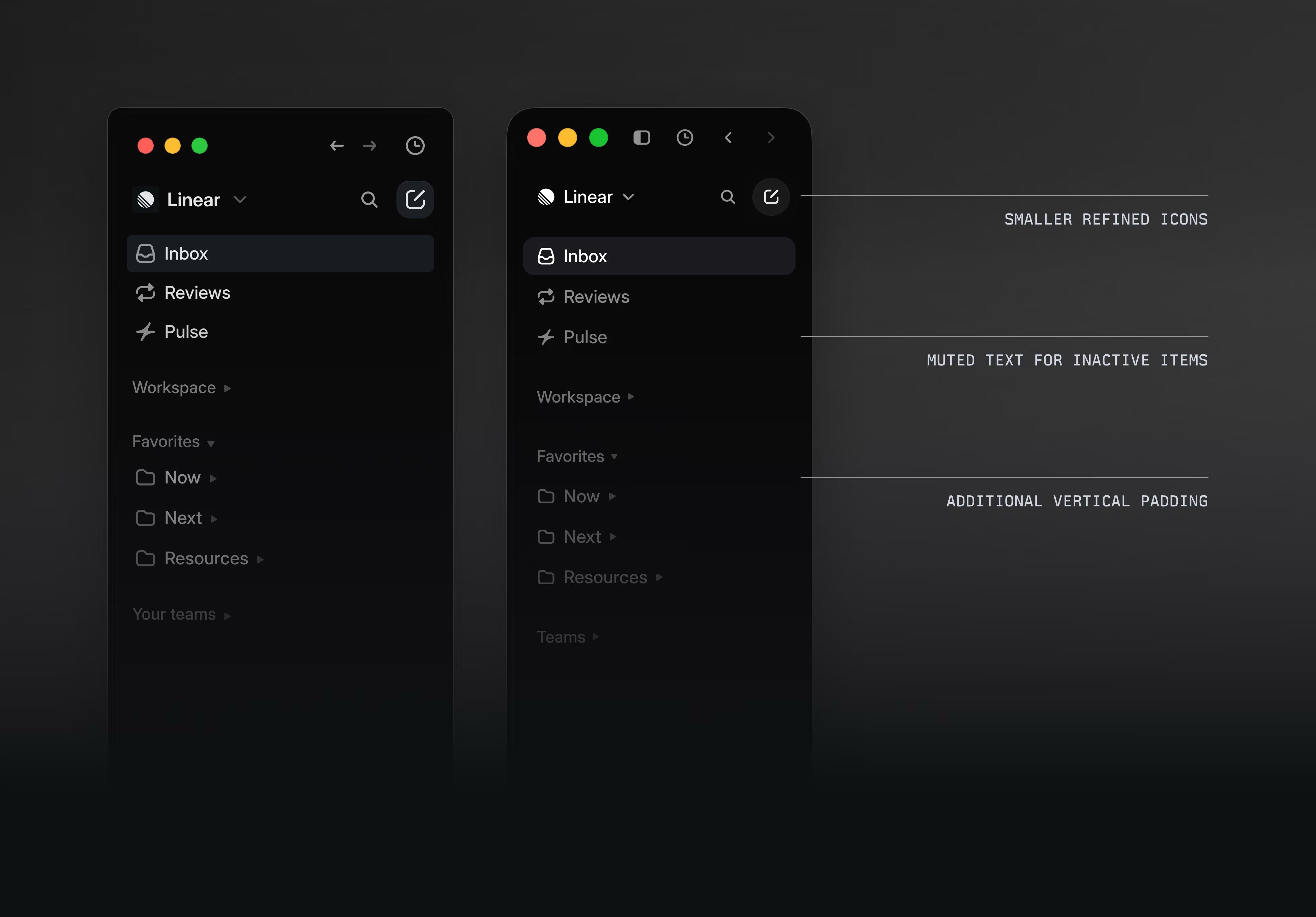
Joining Linear brought a real sense of weight for Charlie. “This is one of the best design teams in the world and the craft is through the roof,” he recalls. “Will I meet the bar?” That question hit home on his first major project: an overhaul of Linear’s core interface. Years of rapid feature releases had gradually cluttered the UI, diluting the product's visual hierarchy. By 2026, it was time for a refresh.
Charlie started by investigating the underlying problems. After customers pushed back on a new issue layout, he used Linear’s AI agent to pull together feedback from Twitter, Slack, and support calls to better understand the underlying problem. He then sketched out three possible approaches into Figma for a design review.
From there, AI became a partner in execution. Charlie translated the research into issue descriptions and proposals that an agent could turn into working previews using real product data. He collaborated with Staff Engineer Maxime Heckel to bring the concepts into the live product, using coding agents to understand the existing system and build custom tools along the way, including an in-app editor for tuning Linear’s new color palette.
The final result was a two-person effort that shipped a major interface refresh. For Charlie, AI didn’t replace the design process; it accelerated it. “I want it to be my thought partner, co-navigating me through the same design process I’ve always used. That doesn’t change the process. It speeds it up.”
I want it to be my thought partner, co-navigating me through the same design process I've always used. That doesn't change the process. It speeds it up.

Charlie Aufmann
Product Designer, Linear
in action
Refreshing Linear's UI
Joining Linear brought a real sense of weight for Charlie. “This is one of the best design teams in the world and the craft is through the roof,” he recalls. “Will I meet the bar?” That question hit home on his first major project: an overhaul of Linear’s core interface. Years of rapid feature releases had gradually cluttered the UI, diluting the product's visual hierarchy. By 2026, it was time for a refresh.
Charlie started by investigating the underlying problems. After customers pushed back on a new issue layout, he used Linear’s AI agent to pull together feedback from Twitter, Slack, and support calls to better understand the underlying problem. He then sketched out three possible approaches into Figma for a design review.
From there, AI became a partner in execution. Charlie translated the research into issue descriptions and proposals that an agent could turn into working previews using real product data. He collaborated with Staff Engineer Maxime Heckel to bring the concepts into the live product, using coding agents to understand the existing system and build custom tools along the way, including an in-app editor for tuning Linear’s new color palette.
The final result was a two-person effort that shipped a major interface refresh. For Charlie, AI didn’t replace the design process; it accelerated it. “I want it to be my thought partner, co-navigating me through the same design process I’ve always used. That doesn’t change the process. It speeds it up.”
I want it to be my thought partner, co-navigating me through the same design process I've always used. That doesn't change the process. It speeds it up.
Charlie Aufmann
Product Designer, Linear
in action
Refreshing Linear's UI
Joining Linear brought a real sense of weight for Charlie. “This is one of the best design teams in the world and the craft is through the roof,” he recalls. “Will I meet the bar?” That question hit home on his first major project: an overhaul of Linear’s core interface. Years of rapid feature releases had gradually cluttered the UI, diluting the product's visual hierarchy. By 2026, it was time for a refresh.
Charlie started by investigating the underlying problems. After customers pushed back on a new issue layout, he used Linear’s AI agent to pull together feedback from Twitter, Slack, and support calls to better understand the underlying problem. He then sketched out three possible approaches into Figma for a design review.
From there, AI became a partner in execution. Charlie translated the research into issue descriptions and proposals that an agent could turn into working previews using real product data. He collaborated with Staff Engineer Maxime Heckel to bring the concepts into the live product, using coding agents to understand the existing system and build custom tools along the way, including an in-app editor for tuning Linear’s new color palette.
The final result was a two-person effort that shipped a major interface refresh. For Charlie, AI didn’t replace the design process; it accelerated it. “I want it to be my thought partner, co-navigating me through the same design process I’ve always used. That doesn’t change the process. It speeds it up.”
I want it to be my thought partner, co-navigating me through the same design process I've always used. That doesn't change the process. It speeds it up.
Charlie Aufmann
Product Designer, Linear
in action
Using AI with purpose
After seeing how constant AI use flattened both her output and judgment, Isha started to use it more selectively.
For example, when rethinking how a coding session opens from an issue, she didn’t jump straight into prompting. Instead, she first used Linear’s agent to ask why the current behavior existed and whether it was intentional—treating AI as a way to surface context before making any decisions herself. Once it was clear the behavior wasn’t intentional, she implemented the fix in Conductor, running it alongside her other sessions. She then reviewed the generated code carefully, rewrote the agent’s pull request description in her own words, and nominated a teammate for review.
She applies the same pattern when exploring states she couldn't easily prototype before, like spinning up a quick visualizer to test how a profile card behaves with long names and varied roles. AI helps her get to these edge cases faster, but she still decides what's good. In her estimate, it now handles most of her “paper cuts,” but only about a tenth of net-new design work.
There's a big difference between using something as a tool and using it as a crutch. AI invites infinite usage, and that makes you trust yourself less. If AI is the only thing you use, that points to blind spots that are preventing you from using it well.

Isha Kumar
Product Designer, Linear
in action
Using AI with purpose
After seeing how constant AI use flattened both her output and judgment, Isha started to use it more selectively.
For example, when rethinking how a coding session opens from an issue, she didn’t jump straight into prompting. Instead, she first used Linear’s agent to ask why the current behavior existed and whether it was intentional—treating AI as a way to surface context before making any decisions herself. Once it was clear the behavior wasn’t intentional, she implemented the fix in Conductor, running it alongside her other sessions. She then reviewed the generated code carefully, rewrote the agent’s pull request description in her own words, and nominated a teammate for review.
She applies the same pattern when exploring states she couldn't easily prototype before, like spinning up a quick visualizer to test how a profile card behaves with long names and varied roles. AI helps her get to these edge cases faster, but she still decides what's good. In her estimate, it now handles most of her “paper cuts,” but only about a tenth of net-new design work.
There's a big difference between using something as a tool and using it as a crutch. AI invites infinite usage, and that makes you trust yourself less. If AI is the only thing you use, that points to blind spots that are preventing you from using it well.
Isha Kumar
Product Designer, Linear
in action
Using AI with purpose
After seeing how constant AI use flattened both her output and judgment, Isha started to use it more selectively.
For example, when rethinking how a coding session opens from an issue, she didn’t jump straight into prompting. Instead, she first used Linear’s agent to ask why the current behavior existed and whether it was intentional—treating AI as a way to surface context before making any decisions herself. Once it was clear the behavior wasn’t intentional, she implemented the fix in Conductor, running it alongside her other sessions. She then reviewed the generated code carefully, rewrote the agent’s pull request description in her own words, and nominated a teammate for review.
She applies the same pattern when exploring states she couldn't easily prototype before, like spinning up a quick visualizer to test how a profile card behaves with long names and varied roles. AI helps her get to these edge cases faster, but she still decides what's good. In her estimate, it now handles most of her “paper cuts,” but only about a tenth of net-new design work.
There's a big difference between using something as a tool and using it as a crutch. AI invites infinite usage, and that makes you trust yourself less. If AI is the only thing you use, that points to blind spots that are preventing you from using it well.
Isha Kumar
Product Designer, Linear
FEATURED LINEAR TEAM MEMBERS
NAME
POSITION
Karri Saarinen
Co-founder & CEO
Charlie Aufmann
Product Designer
Isha Kumar
Product Designer
FEATURED LINEAR TEAM MEMBERS
NAME
POSITION
Karri Saarinen
Co-founder & CEO
Charlie Aufmann
Product Designer
Isha Kumar
Product Designer
FEATURED LINEAR TEAM MEMBERS
NAME
POSITION
Karri Saarinen
Co-founder & CEO
Charlie Aufmann
Product Designer
Isha Kumar
Product Designer
Join the team
Linear Design
Linear works in small, autonomous project teams, where designers are paired tightly with engineers to explore ideas, build prototypes, deploy internal builds, and ultimately ship to customers. They’re a remote-first company, with optional co-working offices in San Francisco, New York, and London.
Join the team
Linear Design
Linear works in small, autonomous project teams, where designers are paired tightly with engineers to explore ideas, build prototypes, deploy internal builds, and ultimately ship to customers. They’re a remote-first company, with optional co-working offices in San Francisco, New York, and London.
Join the team
Linear Design
Linear works in small, autonomous project teams, where designers are paired tightly with engineers to explore ideas, build prototypes, deploy internal builds, and ultimately ship to customers. They’re a remote-first company, with optional co-working offices in San Francisco, New York, and London.

" height="84.64907000000001px" id="LbxKM8inW" transform="translate(0 2.663)" width="84.1602px"/><path d="M 10.28 20.56 C 4.474 20.56 0 15.723 0 10.28 C 0 4.837 4.474 0 10.28 0 C 16.086 0 20.56 4.837 20.56 10.28 C 20.56 15.723 16.086 20.56 10.28 20.56 Z M 1.454 87.307 L 1.454 27.57 L 19.111 27.57 L 19.111 87.307 Z" fill="rgb(247, 246, 244)" height="87.30739914855957px" id="YCbiaWN1B" transform="translate(84.16 0)" width="20.559799999999996px"/><path d="M 10.28 20.56 C 4.474 20.56 0 15.723 0 10.28 C 0 4.837 4.474 0 10.28 0 C 16.085 0 20.559 4.837 20.559 10.28 C 20.559 15.723 16.085 20.56 10.28 20.56 Z M 1.449 87.307 L 1.449 27.57 L 19.106 27.57 L 19.106 87.307 Z" fill="rgb(247, 246, 244)" height="87.30739914855957px" id="zH_XrDBAM" transform="translate(130.715 0)" width="20.558999999999997px"/><path d="M 17.657 61.309 L 0 61.309 L 0 1.571 L 17.657 1.571 L 17.657 9.189 C 21.406 3.383 27.208 0 35.314 0 C 48.977 0 57.323 9.311 57.323 24.427 L 57.323 61.309 L 39.666 61.309 L 39.666 28.539 C 39.666 20.678 35.794 16.203 28.901 16.203 C 22.009 16.203 17.657 21.28 17.657 29.626 Z" fill="rgb(247, 246, 244)" height="61.3085px" id="eiMuoNzTE" transform="translate(158.281 25.999)" width="57.32300000000001px"/><path d="M 28.661 84.649 L 0 84.649 L 0 0 L 28.661 0 C 52.364 0 71.71 18.5 71.71 42.325 C 71.71 66.15 52.364 84.649 28.661 84.649 Z M 28.177 17.055 L 18.141 17.055 L 18.141 67.603 L 28.177 67.603 C 42.202 67.603 53.089 56.359 53.089 42.329 C 53.089 28.299 42.206 17.055 28.177 17.055 Z" fill="rgb(247, 246, 244)" height="84.64903px" id="J8cX6jaQ7" transform="translate(244.497 2.658)" width="71.70999999999998px"/><path d="M 59.374 47.043 C 54.416 56.839 44.742 62.884 31.682 62.884 C 13.06 62.884 0 49.946 0 31.442 C 0 12.938 13.3 0 30.957 0 C 48.614 0 61.43 13.183 61.43 31.922 C 61.43 33.978 61.308 35.428 61.19 36.274 L 17.294 36.274 C 17.901 43.289 24.309 48.366 31.686 48.366 C 38.339 48.366 41.722 45.585 44.507 41.111 L 59.379 47.035 Z M 44.14 24.79 C 43.293 18.382 38.094 13.785 30.839 13.785 C 23.585 13.785 18.023 19.106 17.417 24.79 Z" fill="rgb(247, 246, 244)" height="62.8843px" id="EEhlDLb3Q" transform="translate(319.831 25.999)" width="61.43000000000001px"/><path d="M 19.591 18.259 C 19.591 20.438 21.285 22.009 24.55 22.856 L 32.049 24.79 C 43.294 27.693 49.339 33.861 49.339 42.447 C 49.339 54.42 39.182 62.884 25.274 62.884 C 13.301 62.884 3.99 57.441 0 48.252 L 14.27 40.391 C 16.566 45.35 20.922 48.492 25.397 48.492 C 29.146 48.492 31.682 46.799 31.682 43.896 C 31.682 41.84 29.871 40.268 26.243 39.422 L 19.229 37.728 C 7.862 35.07 2.178 28.902 2.178 19.346 C 2.178 8.102 11.611 0 25.274 0 C 35.554 0 45.105 5.683 48.977 13.907 L 34.585 21.525 C 32.774 17.05 28.902 14.147 25.152 14.147 C 21.887 14.147 19.591 15.841 19.591 18.259 Z" fill="rgb(247, 246, 244)" height="62.8843px" id="Sysofxql0" transform="translate(381.619 25.999)" width="49.339px"/><path d="M 10.28 20.56 C 4.475 20.56 0 15.723 0 10.28 C 0 4.837 4.475 0 10.28 0 C 16.086 0 20.56 4.837 20.56 10.28 C 20.56 15.723 16.086 20.56 10.28 20.56 Z M 1.454 87.307 L 1.454 27.57 L 19.111 27.57 L 19.111 87.307 Z" fill="rgb(247, 246, 244)" height="87.30739914855957px" id="LrgCEFOom" transform="translate(434.219 0)" width="20.560000000000002px"/><path d="M 46.799 51.875 C 43.049 57.319 36.035 60.702 28.177 60.702 C 11.974 60.702 0 47.764 0 30.713 C 0 13.663 12.092 0 28.177 0 C 36.279 0 43.416 3.505 46.799 9.311 L 46.799 1.572 L 64.212 1.572 L 64.212 57.437 C 64.212 76.181 52.243 88.997 31.32 88.997 C 17.173 88.997 6.291 82.951 1.572 73.156 L 15.597 64.814 C 18.862 70.737 24.546 74.125 31.316 74.125 C 40.989 74.125 46.795 68.079 46.795 57.437 L 46.795 51.875 Z M 32.529 15.597 C 24.306 15.597 17.775 22.249 17.775 30.713 C 17.775 39.177 24.306 45.83 32.529 45.83 C 40.753 45.83 47.402 39.177 47.402 30.713 C 47.402 22.249 40.749 15.597 32.529 15.597 Z" fill="rgb(247, 246, 244)" height="88.99680000000001px" id="cXmWLczeW" transform="translate(459.371 26.003)" width="64.21199999999999px"/><path d="M 17.658 61.309 L 0 61.309 L 0 1.571 L 17.658 1.571 L 17.658 9.189 C 21.407 3.383 27.208 0 35.315 0 C 48.977 0 57.324 9.311 57.324 24.427 L 57.324 61.309 L 39.667 61.309 L 39.667 28.539 C 39.667 20.678 35.795 16.203 28.902 16.203 C 22.01 16.203 17.658 21.28 17.658 29.626 Z" fill="rgb(247, 246, 244)" height="61.3085px" id="LrfyMAbTJ" transform="translate(531.802 25.999)" width="57.323999999999955px"/><path d="M 5.072 1.785 L 3.414 1.785 L 3.414 7.163 L 1.659 7.163 L 1.659 1.785 L 0 1.785 L 0 0 L 5.072 0 Z" fill="rgb(247, 246, 244)" height="7.16323px" id="OaxHZC61I" transform="translate(579 0)" width="5.072310000000016px"/><path d="M 3.71 4.317 L 5.583 0 L 7.386 0 L 7.386 7.163 L 5.666 7.163 L 5.666 3.955 L 4.256 7.163 L 3.121 7.163 L 1.72 3.968 L 1.72 7.163 L 0 7.163 L 0 0 L 1.838 0 Z" fill="rgb(247, 246, 244)" height="7.16323px" id="UYYrwHk7B" transform="translate(584.509 0)" width="7.385809999999992px"/></svg>)
" height="45.8152px" id="FYbRQa4AC" width="32.4449px"/><path d="M 19.271 0 C 32.052 0 38.542 11.078 38.542 23.334 C 38.542 35.589 32.052 46.667 19.271 46.667 C 6.49 46.667 0 35.589 0 23.334 C 0 11.078 6.49 0 19.271 0 Z M 19.271 9.109 C 12.651 9.109 9.767 16.188 9.767 23.331 C 9.767 30.474 12.651 37.553 19.271 37.553 C 25.891 37.553 28.775 30.474 28.775 23.331 C 28.775 16.188 25.891 9.109 19.271 9.109 Z" fill="rgb(247, 246, 244)" height="46.667px" id="Y6HS1kBhl" transform="translate(33.749 0)" width="38.5421px"/><path d="M 32.05 14.551 C 32.05 20.253 29.298 24.578 22.416 30.15 C 20.12 31.986 17.958 33.756 16.321 35.066 C 15.336 35.852 14.421 36.574 13.569 37.163 L 32.445 37.163 L 32.445 45.815 L 0 45.815 L 0 38.081 L 17.172 23.334 C 20.842 20.187 22.285 17.828 22.285 15.206 C 22.285 11.537 19.598 9.045 16.124 9.045 C 12.192 9.045 9.701 12.192 9.637 16.713 L 0.132 16.713 C 0.132 6.554 6.424 0 16.124 0 C 25.3 0 32.052 6.031 32.052 14.551 Z" fill="rgb(247, 246, 244)" height="45.8152px" id="LWOhrRaiR" transform="translate(73.078 0)" width="32.44489999999999px"/><path d="M 17.106 45.879 C 7.405 45.879 0 38.866 0 29.428 C 0 25.3 1.507 20.842 4.521 16.188 L 14.943 0 L 26.085 0 L 15.991 14.617 C 17.04 14.158 18.286 14.028 19.268 14.028 C 27.921 14.028 34.212 20.911 34.212 29.301 C 34.212 38.738 26.806 45.884 17.106 45.884 Z M 17.106 22.15 C 12.845 22.15 9.504 25.427 9.504 29.556 C 9.504 33.685 12.847 37.094 17.042 37.094 C 21.237 37.094 24.71 33.751 24.71 29.622 C 24.71 25.494 21.301 22.15 17.108 22.15 Z" fill="rgb(247, 246, 244)" height="45.883838px" id="FYRnnNH_z" transform="translate(105.85 0.789)" width="34.21200000000002px"/></svg>)